NVIDIA GPU Support
How the unbounded-agent discovers, configures, and exposes NVIDIA GPUs to Kubernetes workloads.
The unbounded-agent automatically detects NVIDIA GPUs on the host, forwards the driver’s userspace libraries into the nspawn container, generates a CDI specification, and configures containerd so that GPU workloads can be scheduled on the node.
Prerequisites
Before the agent can expose GPUs, the host VM must have:
- NVIDIA kernel drivers loaded.
/dev/nvidia*device nodes must exist. - NVIDIA userspace libraries installed.
ldconfig -pmust listlibcuda,libnvidia-ml, and related libraries. - Fabric Manager running (NVSwitch-based GPUs only). H100, H200, and
multi-GPU ND A100 systems require the
nvidia-fabricmanagerservice. Without it, CUDA initialisation fails with error 802 (SYSTEM_DRIVER_MISMATCH). - Persistence mode enabled.
nvidia-smi -pm 1keeps the driver loaded between GPU process invocations and avoids cold-start latency.
The GPU OCI image (agent-ubuntu2404-nvidia) includes the NVIDIA Container
Toolkit (nvidia-ctk, nvidia-container-runtime) but not the kernel
driver or userspace libraries. Those come from the host.
How It Works
The agent’s GPU support spans two bootstrap phases: rootfs (nspawn configuration) and node-start (runtime setup inside the container). The full sequence is:
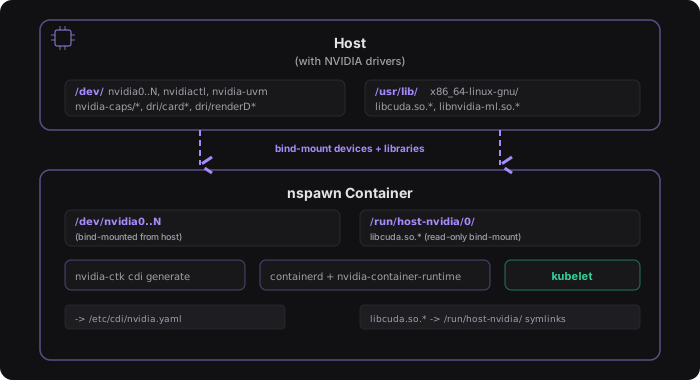
- Device discovery. Scans
/devfor NVIDIA device nodes (per-GPU, control, UVM, capability, and DRI render nodes). If none are found, the entire GPU pipeline is skipped. - Library discovery. Queries
ldconfig -pon the host and filters for NVIDIA libraries matching the host architecture. Deduplicates parent directories and assigns each a numbered mount index. - nspawn configuration. Writes device bind-mounts, read-only library
bind-mounts at
/run/host-nvidia/<index>/, andDeviceAllowcgroup entries into the nspawn and systemd service override configs. - NVIDIA setup. After the nspawn boots, creates symlinks in the
container’s multiarch library directory pointing into
/run/host-nvidia/, runsldconfig, then runsnvidia-ctk cdi generateto produce the CDI spec at/etc/cdi/nvidia.yaml. Most CDI hooks are disabled to avoid interference with the nspawn environment. - containerd runtime configuration. Writes a containerd drop-in that
enables CDI support and registers the
nvidiaruntime class. - kubelet GPU advertisement. Once kubelet starts and a user-deployed
NVIDIA device plugin is running, GPUs are registered as
nvidia.com/gpuextended resources on the node.
Architecture Support
Library discovery is architecture-aware. The agent uses runtime.GOARCH to
select the correct multiarch library path and ldconfig filter:
| GOARCH | ldconfig tag | Library directory |
|---|---|---|
amd64 | x86-64 | /usr/lib/x86_64-linux-gnu |
arm64 | aarch64 | /usr/lib/aarch64-linux-gnu |
GPU OCI Image
The GPU rootfs image (images/agent-ubuntu2404-nvidia/Containerfile) extends
the standard Ubuntu 24.04 base with the NVIDIA Container Toolkit:
nvidia-container-runtime: OCI runtime wrapper that injects GPU devices.nvidia-ctk: generates CDI specifications from discovered hardware.libnvidia-container: low-level library for GPU container setup.
The image does not include NVIDIA kernel drivers or userspace libraries. Those are forwarded from the host at boot time via the bind-mount mechanism described above.
Troubleshooting
CUDA error 802 (SYSTEM_DRIVER_MISMATCH)
This means Fabric Manager is not running. It is required for NVSwitch-based multi-GPU systems (H100, H200, ND A100):
sudo systemctl status nvidia-fabricmanager
sudo systemctl start nvidia-fabricmanager
nvidia-ctk cdi generate fails with ERROR_LIBRARY_NOT_FOUND
The host NVIDIA libraries are not visible inside the nspawn. Check that:
- The bind-mounts in the
.nspawnconfig include the host library directory. - The symlinks in the container’s multiarch lib dir point to valid paths
under
/run/host-nvidia/. ldconfigwas run after symlink creation.
CDI spec has no device entries
Ensure the kernel driver is loaded (lsmod | grep nvidia) and that
/dev/nvidia0 exists. If the driver is installed but not loaded, reboot the
host.