systemd-nspawn Isolation
How the unbounded-agent uses systemd-nspawn to isolate Kubernetes worker node components.
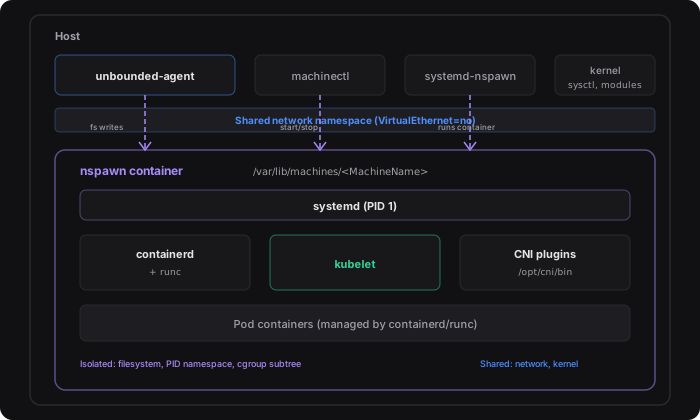
The unbounded-agent runs all Kubernetes worker node components inside a systemd-nspawn container. This provides lightweight OS-level isolation (separate filesystem, PID, and cgroup namespaces) while sharing the host kernel. The container runs a full systemd init tree so that kubelet, containerd, and their dependencies are managed as regular systemd services, decoupled from anything running on the host.
Why nspawn
Running kubelet directly on the host requires careful package management and risks conflicting with existing services. An nspawn container gives the agent a clean, reproducible environment:
- Filesystem isolation. Kubernetes binaries, configuration, and runtime state live inside the container’s rootfs and do not interfere with the host.
- Process isolation. The container has its own PID namespace. A full systemd instance (PID 1 inside the container) supervises containerd and kubelet with automatic restart policies.
- Cgroup isolation. The container gets its own cgroup subtree. Nested containers (pods) created by runc operate under cgroups v2 inside this subtree.
- Shared network namespace. The container shares the host’s network stack
(
VirtualEthernet=no), so kubelet uses the host’s routable IP directly and CNI plugins can create interfaces (WireGuard tunnels, overlay bridges) that are visible on the host. - Simplified upgrades. Upgrading Kubernetes is a matter of replacing the container rootfs and restarting the nspawn machine. The host OS remains untouched, eliminating the need to coordinate package upgrades across the host and the node stack.
Container Rootfs
The rootfs is a plain directory tree at /var/lib/machines/<MachineName>. It
is created during the rootfs bootstrap phase by one of two methods:
| Method | When used | Description |
|---|---|---|
| OCI image | Default | Pulls a pre-built Ubuntu 24.04 image via ORAS and unpacks it into the machine directory. A GPU variant includes the NVIDIA Container Toolkit. |
| Debootstrap | Fallback (AGENT_DISABLE_OCI_IMAGE=1) | Runs debootstrap to create a minimal Ubuntu Noble rootfs with systemd, dbus, curl, and networking tools. This method is deprecated and will be removed in a future release. |
After the rootfs exists, the agent downloads Kubernetes binaries (kubelet,
kubectl, kube-proxy), containerd, runc, and CNI plugins directly into
the rootfs before the container boots. Configuration files (containerd
config, kubelet service units, bootstrap kubeconfig, CA certificates, hostname,
and resolv.conf) are also written into the rootfs at their standard
absolute paths (e.g. /var/lib/machines/<MachineName>/etc/containerd/config.toml
becomes /etc/containerd/config.toml inside the container).
OCI Images
The agent ships with two pre-built rootfs images based on Ubuntu 24.04 (Noble). The correct image is selected automatically based on whether NVIDIA GPUs are detected on the host.
| Image | Default repository | Description |
|---|---|---|
agent-ubuntu2404 | ghcr.io/azure/agent-ubuntu2404 | Base image with systemd, dbus, curl, iproute2, nftables, kmod, and wireguard-tools. (Containerfile) |
agent-ubuntu2404-nvidia | ghcr.io/azure/agent-ubuntu2404-nvidia | Extends the base image with the NVIDIA Container Toolkit (nvidia-ctk, nvidia-container-runtime). (Containerfile) |
The agent pins a specific image tag by default at build time. The OCIImage
field in the agent config can override the full image reference for custom or
pinned builds.
Image sources are maintained in the images/ directory of the repository.
Machine Configuration
The agent configures the nspawn machine to share the host network namespace
(VirtualEthernet=no) so that kubelet uses the host’s routable IP directly and
CNI plugins can manage interfaces visible on the host. It also makes
/proc/sys/net writable inside the container so that CNI plugins and
kube-proxy can set network sysctls, while the rest of /proc/sys stays
read-only. Cgroups v2 is forced inside the container to ensure consistent
behavior regardless of the systemd version in the rootfs.
When NVIDIA GPUs are detected on the host, the agent automatically bind-mounts
the GPU device nodes (e.g. /dev/nvidia0, /dev/nvidiactl) and the host’s
driver libraries into the container, and grants the necessary cgroup device
permissions. See NVIDIA GPU Support for
the full GPU pipeline.
When the KVM character device (/dev/kvm) is present on the host, the agent
automatically bind-mounts it into the container so that workloads inside the
container can use hardware virtualisation (e.g. QEMU/KVM virtual machines).
The configuration is written to two files on the host before the machine boots:
| File | Path |
|---|---|
| nspawn config | /etc/systemd/nspawn/<MachineName>.nspawn |
| Service override | /etc/systemd/system/systemd-nspawn@<MachineName>.service.d/override.conf |
Customization points
| Setting | File | Purpose |
|---|---|---|
Capability=all | nspawn config | Grants all capabilities for nested container runtimes (runc). |
PrivateUsers=no | nspawn config | Disables user namespace remapping so runc can use real root. |
SystemCallFilter=@keyring bpf | nspawn config | Allows kernel keyring (containerd) and eBPF (runc cgroups v2 device control) syscalls. |
VirtualEthernet=no | nspawn config | Shares the host network namespace. |
SYSTEMD_NSPAWN_UNIFIED_HIERARCHY=1 | Service override | Forces cgroups v2 inside the container. |
SYSTEMD_NSPAWN_API_VFS_WRITABLE=network | Service override | Makes /proc/sys/net writable for CNI and kube-proxy. |
Bind=/dev/kvm | nspawn config | KVM device bind-mount (auto-generated when /dev/kvm is present). |
Bind= / BindReadOnly= | nspawn config | GPU device and library bind-mounts (auto-generated when GPUs are present). |
DeviceAllow= | Service override | Cgroup device permissions for GPU nodes (auto-generated when GPUs are present). |
What Runs Inside the Container
The nspawn container hosts the complete Kubernetes worker node stack:
- systemd (PID 1 inside the container)
- containerd (container runtime)
- runc (OCI runtime)
- kubelet (Kubernetes node agent)
- kubectl, kube-proxy
- CNI plugins (under
/opt/cni/bin) - All Kubernetes pod containers (managed by containerd and runc)
The unbounded-agent itself and host-side management tools such as
machinectl and systemctl remain on the host. machinectl is used to
start, inspect, and access the machine, while the lifecycle of the backing
systemd-nspawn@<MachineName>.service is managed via systemctl. NVIDIA
kernel drivers and userspace libraries also stay on the host and are forwarded
into the container via bind-mounts.
Lifecycle
Startup
The agent’s three-phase bootstrap drives the nspawn lifecycle:
Host preparation. Installs the
systemd-containerpackage (providessystemd-nspawnandmachinectl), sets kernel sysctl values that the container cannot write (because/proc/sysis read-only), and installs anftables-flush.serviceoneshot that clears stale firewall rules before anysystemd-nspawn@.servicestarts.Rootfs preparation. Creates the rootfs, writes the
.nspawnconfig and service override, downloads Kubernetes and container runtime binaries, and configures the OS inside the rootfs (hostname, DNS, kernel modules).Node start. Starts the nspawn machine, polls until it is responsive, then enables containerd and kubelet inside it.
Networking
The container operates in the host’s network namespace (VirtualEthernet=no):
- No virtual ethernet pair, bridge, or NAT is created.
- Kubelet binds to
0.0.0.0and uses the host’s routable IP. - CNI plugins create network interfaces (WireGuard, VXLAN, overlay bridges) that are visible on both the host and inside the container.
/proc/sys/netis writable inside the container so that CNI plugins and kube-proxy can configure network sysctls.- Host-level sysctl values (
net.ipv4.ip_forward,net.bridge.bridge-nf-call-iptables, etc.) are pre-set on the host because the rest of/proc/sysis read-only. - DNS resolution uses a static copy of the host’s
resolv.conf.systemd-resolvedis masked inside the container to prevent it from overwriting the file. The host’s stub resolver at127.0.0.53is reachable because the network namespace is shared.
Key Paths
| Path | Description |
|---|---|
/var/lib/machines/<MachineName> | Container rootfs directory. |
/etc/systemd/nspawn/<MachineName>.nspawn | nspawn configuration file. |
/etc/systemd/system/systemd-nspawn@<MachineName>.service.d/override.conf | Systemd service override. |
/run/host-nvidia/<index>/ | (Inside container) Read-only bind-mount of host NVIDIA library directories. |
See Also
- Agent Configuration:
JSON config file specification including
MachineNameandOCIImage. - NVIDIA GPU Support: How GPU devices and libraries are forwarded into the nspawn container.
- Agent Guide: End-to-end walkthrough of the three-phase bootstrap.
- Reset Node: How to tear down the nspawn machine and clean up.