Getting Started
Create an AKS cluster with Unbounded and join your first remote node.
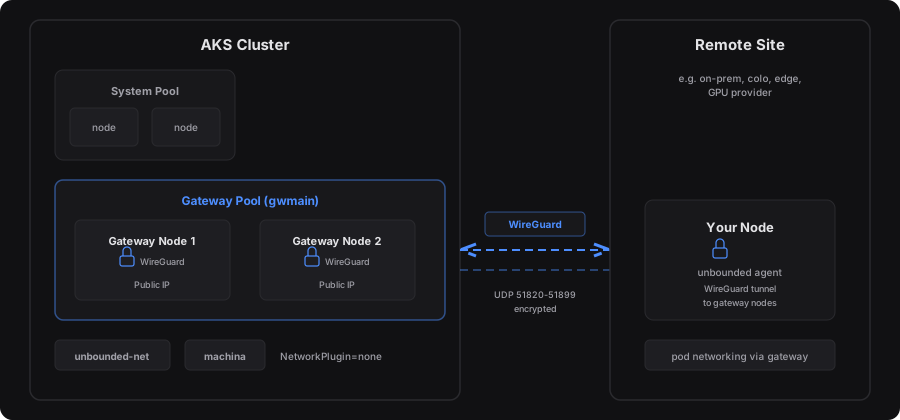
This guide creates an AKS cluster configured for Unbounded and joins a remote node to it. You’ll have a working multi-site cluster in a few minutes.
Already have a Kubernetes cluster? See the Bring Your Own Cluster guide.
What You’ll Do
- Install the prerequisites – az CLI, kubectl, and the unbounded plugin
- Create the cluster – one command to create AKS with gateways
- Add a remote node – pipe a bootstrap script over SSH
- Verify connectivity – watch the node join
1. Install the Prerequisites
You’ll need: An Azure subscription, a terminal, and a remote Linux machine (x86_64 or arm64) with SSH access.
Install the Azure CLI, kubectl, and the unbounded kubectl plugin:
# Azure CLI
curl -sL https://aka.ms/InstallAzureCLIDeb | sudo bash
az login

# kubectl
az aks install-cli

# kubectl-unbounded (Linux amd64)
curl -sL https://github.com/Azure/unbounded/releases/latest/download/kubectl-unbounded-linux-amd64.tar.gz | tar xz
sudo mv kubectl-unbounded /usr/local/bin/
macOS (Apple Silicon)
# kubectl-unbounded (macOS arm64)
curl -sL https://github.com/Azure/unbounded/releases/latest/download/kubectl-unbounded-darwin-arm64.tar.gz | tar xz
sudo mv kubectl-unbounded /usr/local/bin/
Verify:
az version && kubectl version --client && kubectl unbounded --help
2. Create the Cluster
Download and run the quickstart script:
curl -fsSLO https://raw.githubusercontent.com/Azure/unbounded/main/hack/scripts/aks-quickstart.sh
chmod +x aks-quickstart.sh

./aks-quickstart.sh create \
    --name my-unbounded \
    --location eastus \
    --remote-node-cidr 192.168.1.0/24 \
    --remote-pod-cidr 10.245.0.0/16
This takes about 8 minutes. The script creates an AKS cluster, adds a gateway node pool, and runs
kubectl unbounded site initto install the networking stack.
| Flag | Description |
|---|---|
--name | Cluster name (also used as the Azure resource group) |
--location | Azure region |
--remote-node-cidr | Subnet of your remote machines (e.g. 192.168.1.0/24). Must not overlap with the AKS VNet. |
--remote-pod-cidr | IP range to allocate for pods at the remote site (e.g. 10.245.0.0/16). Must not overlap with the cluster’s pod or service CIDRs. |
--remote-node-cidr and --remote-pod-cidr ranges must not overlap with the AKS VNet, pod CIDR, or service CIDR. Overlapping ranges will cause routing failures that are difficult to diagnose after the cluster is running.All options
| Flag | Default | Description |
|---|---|---|
--name | (required) | Cluster name |
--resource-group | same as --name | Azure resource group |
--location | canadacentral | Azure region |
--k8s-version | AKS default | Kubernetes version |
--system-pool-sku | Standard_D2ads_v6 | System pool VM size |
--system-pool-count | 2 | System pool node count |
--gateway-pool-sku | Standard_D2ads_v6 | Gateway pool VM size |
--gateway-pool-count | 2 | Gateway pool node count |
--service-cidr | 10.0.0.0/16 | Kubernetes service CIDR |
--site-name | remote | Remote site name |
--remote-node-cidr | (required) | Subnet of remote machines (must not overlap AKS VNet) |
--remote-pod-cidr | (required) | Pod CIDR for remote site (must not overlap cluster pod/service CIDRs) |
--ssh-key | auto-generated | Path to SSH public key |
--public-ip-strategy | node | node (per-node public IP) or lb (load balancer) |
3. Add a Remote Node
Don’t have a remote machine handy? The quickstart script can create an Azure VM for you in its own resource group and VNet:
./aks-quickstart.sh create-azure-vm \
    --name my-remote-vm \
    --location eastus
The command reads the node CIDR from the remote site created in the previous
step and provisions an Ubuntu 24.04 LTS VM with SSH access. See
./aks-quickstart.sh create-azure-vm --help for all options.
Generate a bootstrap script and pipe it to your remote machine over SSH:
kubectl unbounded machine manual-bootstrap my-node --site remote \
    | ssh user@<host> sudo bash
Replace
user@<host>with the SSH user and IP of your remote machine. The node installs the Unbounded agent, opens a WireGuard tunnel to the gateway nodes, and registers with the cluster.
4. Verify Connectivity
Watch the node join the cluster:
kubectl get nodes -w
After a few minutes your remote node appears with status Ready.
Test pod networking
Deploy a test pod on the remote node and verify cross-site connectivity:
# Run a pod on the remote node
kubectl run test-remote --image=busybox --restart=Never \
    --overrides='{"spec":{"nodeSelector":{"net.unbounded-cloud.io/site":"remote"}}}' \
    -- sleep 3600

# Get a cluster node's internal IP
CLUSTER_NODE_IP=$(kubectl get nodes -l 'net.unbounded-cloud.io/site=cluster' \
    -o jsonpath='{.items[0].status.addresses[?(@.type=="InternalIP")].address}')

# Ping a cluster node from the remote pod (cross-site, over WireGuard)
kubectl exec test-remote -- ping -c 3 "$CLUSTER_NODE_IP"

# Run a pod on a cluster node and curl it from the remote pod
kubectl run test-cluster --image=nginx --restart=Never \
    --overrides='{"spec":{"nodeSelector":{"net.unbounded-cloud.io/site":"cluster"}}}'
kubectl wait --for=condition=ready pod/test-cluster --timeout=60s
CLUSTER_POD_IP=$(kubectl get pod test-cluster -o jsonpath='{.status.podIP}')
kubectl exec test-remote -- wget -qO- "http://$CLUSTER_POD_IP"

# Clean up
kubectl delete pod test-remote test-cluster
If the ping and wget succeed, pod networking is working across sites through the WireGuard tunnels.
What the Script Creates
The quickstart script automates AKS infrastructure setup and then delegates to
kubectl unbounded site init for the
Kubernetes-level configuration. Here’s what each piece does.
AKS Cluster (BYO CNI)
Created with --network-plugin none so AKS does not install a default CNI.
unbounded-net serves as the CNI and handles both local pod networking and
cross-site routing through WireGuard. If your cluster already has a CNI
(e.g. Azure CNI, Cilium, Calico), that works too – pass
--manage-cni-plugin=false to site init and see the
Existing Cluster guide for details.
Gateway Node Pool
A dedicated gwmain pool separate from the system pool:
- Per-node public IPs – remote nodes connect directly to gateway IPs to establish WireGuard tunnels
- UDP 51820-51899 open – AKS
AllowedHostPortscreates the NSG rules automatically - Tainted
CriticalAddonsOnly=true:NoSchedule– only networking components run here - Labeled
unbounded-cloud.io/unbounded-net-gateway=true– tells unbounded-net which nodes are gateways
unbounded-net CNI
The networking plugin that connects sites. A controller allocates pod CIDRs and manages WireGuard keys. A node agent (DaemonSet) configures WireGuard interfaces and programs routes. Cross-site traffic is encrypted; intra-site traffic uses GENEVE.
SitePeering configuration.Site Resources
- GatewayPool (
gw-main) – selects gateway-labeled nodes for routing - Site – defines network ranges; one for the AKS nodes (
cluster), one for your remote site - SiteGatewayPoolAssignment – links each site to the gateway pool
Machina Controller and Bootstrap Token
Machina handles SSH-based node
provisioning. A bootstrap token in kube-system lets new nodes authenticate
during the join process. The manual-bootstrap command embeds this token into
the install script.
If you already have provisioned hosts with SSH access (e.g. GPU nodes from a third-party provider), machina can provision them automatically – see the SSH Guide for details. Other provisioning methods are also supported:
Cleanup
Delete the resource group to remove all Azure resources:
az group delete --name my-unbounded --yes --no-wait
Next Steps
- Project Overview – how the components fit together
- Bring Your Own Cluster – add Unbounded to an existing cluster
- SSH Guide – bastion hosts, troubleshooting, and the full provisioning lifecycle
- Networking Concepts – cross-site pod networking deep dive
- CLI Reference – all
kubectl unboundedcommands and flags