Bare Metal Provisioning
How metalman PXE-boots bare-metal servers and joins them to your cluster.
When to Use Bare Metal Provisioning
Use metalman when you have physical servers that need to be:
- Netbooted from bare metal (no pre-installed OS).
- Repaved on demand without physical access.
- Power-managed remotely via Redfish BMC APIs.
- Securely bootstrapped using TPM 2.0 hardware attestation.
If your machines already have Linux installed and are reachable via SSH, use the SSH provisioning path instead.
How PXE Boot Works
PXE (Preboot Execution Environment) is a firmware feature that lets a machine boot from the network instead of a local disk. metalman acts as the PXE infrastructure:
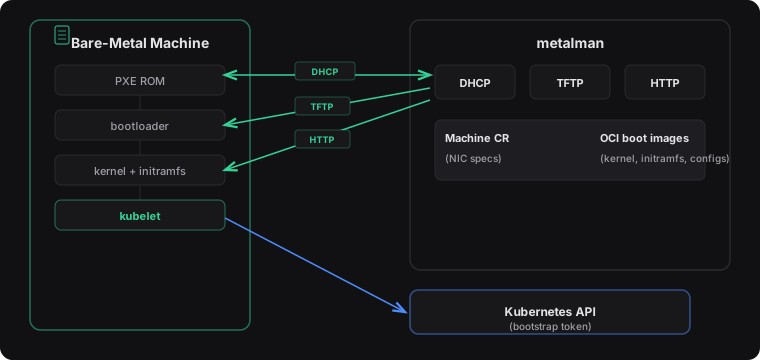
The boot flow in detail:
DHCP Discovery – The machine’s PXE firmware broadcasts a DHCP request. metalman responds with an IP address and the location of the bootloader.
TFTP Boot – The firmware downloads the bootloader via TFTP.
HTTP Artifacts – The bootloader fetches the kernel, initramfs, and configuration files from metalman’s HTTP server. These are sourced from OCI netboot images referenced by the Machine’s
spec.pxe.imagefield.Kernel Boot – The machine boots into the downloaded kernel and initramfs.
Token Retrieval – The init process contacts metalman’s health endpoint to retrieve a bootstrap token. If TPM 2.0 is available, the token is encrypted to the machine’s TPM.
Cluster Join – kubelet uses the bootstrap token to join the Kubernetes cluster, just like an SSH-provisioned node.
Node Ready – machina detects the new Node object and transitions the Machine to the Ready phase.
Key Concepts
DHCP Modes
metalman supports two DHCP modes depending on your network topology:
Interface mode (
--dhcp-interface eth0) – metalman listens for broadcast DHCP on a specific NIC. Use this when metalman runs on the same L2 segment as the bare-metal machines.Relay mode (default, no
--dhcp-interface) – metalman listens for unicast DHCP forwarded by a DHCP relay agent. Use this when metalman and the machines are on different subnets.
OCI Netboot Images
Netboot images are standard OCI container images built FROM scratch that
contain all files needed for PXE booting a machine under /disk/. Files with a
.tmpl suffix are Go templates rendered per-machine at serve time; other files
are served verbatim. A metadata.yaml file provides image-level configuration
(e.g. dhcpBootImageName).
| Aspect | Description |
|---|---|
| Binary artifacts | Kernel, initramfs, bootloader — served verbatim from the OCI image |
| Templates | Files with .tmpl suffix — rendered from Go templates with per-machine context (e.g., kernel command line) |
| Configuration | metadata.yaml — image-level settings such as the DHCP boot filename |
OCI images are referenced by Machine resources via spec.pxe.image and are
pulled and cached locally by the OCI reconciler.
Machine CRD (PXE Fields)
For PXE-provisioned machines, the Machine resource includes:
spec.pxe.image– OCI image reference containing netboot artifacts (e.g."ghcr.io/azure/images/host-ubuntu2404:v1").spec.pxe.dhcpLeases– NIC specifications: MAC address and IP assignment for each interface.spec.pxe.redfish– Optional BMC connection details (endpoint, username, password secret) for remote power management.spec.pxe.cloudInit– Optional cloud-init customization. References a ConfigMap containing user-data that is merged with the vendor-data managed by Unbounded.
Site Isolation
In environments with multiple metalman instances (e.g., different racks or
sites), the --site flag scopes each instance to machines labeled with
unbounded-cloud.io/site=<name>. This prevents one metalman from interfering
with another’s machines.
TPM 2.0 Attestation
metalman uses TPM 2.0 for secure bootstrap token delivery:
Endorsement Key (EK) TOFU – On first boot, the machine presents its TPM Endorsement Key. metalman records it using a Trust-On-First-Use model.
MakeCredential / ActivateCredential – metalman encrypts the bootstrap token using the TPM’s EK. Only the machine with the matching TPM can decrypt it via
ActivateCredential.AES-256-GCM – The actual token payload is encrypted with AES-256-GCM, with the key wrapped by the TPM credential.
This ensures that bootstrap tokens cannot be intercepted by other machines on the network.
Counter-Based Operations
metalman supports two counter-based operations for day-2 management:
- Reboot – Increment
spec.operations.rebootCounterto trigger a reboot via Redfish. - Repave – Increment
spec.operations.repaveCounterto wipe and re-provision the machine from scratch.
The controller compares the spec counter against the status counter and acts when they differ.
Next Steps
- PXE Guide – Step-by-step walkthrough for deploying metalman and booting your first bare-metal node.
- CRD Reference – Full API specification for the Machine resource.
- Architecture Reference – How metalman fits into the broader system.