Kubernetes Without Boundaries
Add any Linux machine to your Kubernetes cluster - cloud, on-prem, bare metal, or edge - no matter where it lives or what network it's on.
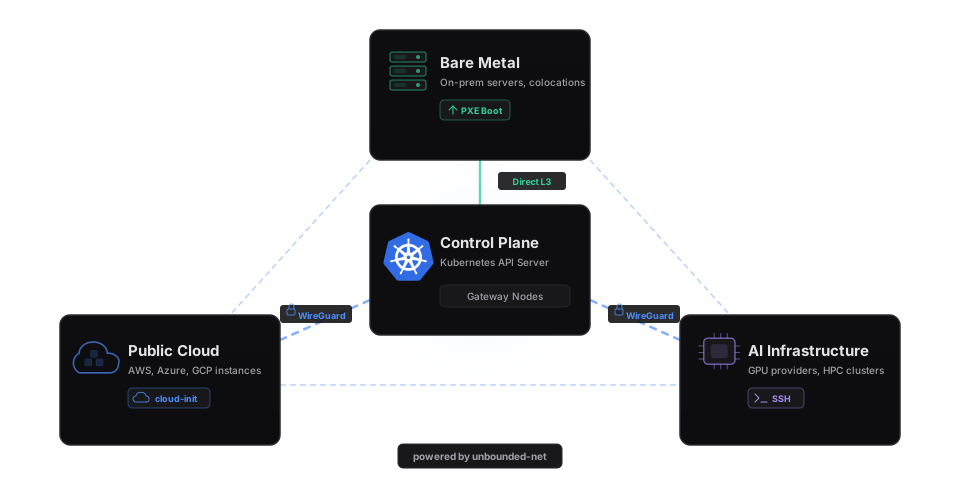
Key Features
Multi-Site Networking
Transparent pod-to-pod connectivity across sites using WireGuard, GENEVE, VXLAN, IPIP, or direct routing with an eBPF dataplane.
SSH-Based Provisioning
Join existing Linux machines to the cluster over SSH with a single command.
Cloud API Provisioning
Auto-provision instances from Nebius, CoreWeave, OCI, Azure, AWS, and others in response to unschedulable pods.
Bare-Metal PXE Boot
PXE-boot servers with integrated DHCP, TFTP, HTTP, Redfish BMC power management, and TPM 2.0 attestation.
Any Conformant Kubernetes
AKS, EKS, GKE, kubeadm, k3s, and more. Bring your own cluster or use the quickstart script.
GPU Support
Automatic detection and configuration of NVIDIA GPUs on provisioned nodes.
What you can do with it
Quick Start
Get a working multi-site cluster in under 10 minutes. Already have a cluster? See the Bring Your Own Cluster guide.
- 1Install the kubectl plugin
curl -sL https://github.com/Azure/unbounded/releases/latest/download/kubectl-unbounded-linux-amd64.tar.gz | tar xz sudo mv kubectl-unbounded /usr/local/bin/ - 2Create the cluster
curl -fsSLO https://raw.githubusercontent.com/Azure/unbounded/main/hack/scripts/aks-quickstart.sh chmod +x aks-quickstart.sh ./aks-quickstart.sh create \ --name my-unbounded \ --location eastus \ --remote-node-cidr 192.168.1.0/24 \ --remote-pod-cidr 10.245.0.0/16 - 3Add a remote nodeReplace user@remote-host with the SSH user and IP of your remote machine.
kubectl unbounded machine manual-bootstrap my-node --site remote \ | ssh user@remote-host sudo bash - 4Verify
kubectl get nodes -w
Explore the Docs
Jump to what you need.
Get Started
Getting Started Guide
End-to-end walkthrough - from zero to a running multi-site cluster.
→Deploy to an Existing Cluster
Add Unbounded to a cluster you already have running.
→Add a Remote Node via SSH
Point machina at any reachable Linux host and watch it join your cluster.
→Connect & Scale
Set Up Cross-Site Networking
WireGuard tunnels, GENEVE overlays, and eBPF routing across sites.
→Connect Cloud Instances
Spin up GPU or compute instances and have them join via cloud-init.
→PXE Boot Bare-Metal Servers
Netboot machines with metalman's DHCP, TFTP, and HTTP stack.
→